The 12-Testers Requirement
Understand who must complete the 12-tester requirement and when it applies.
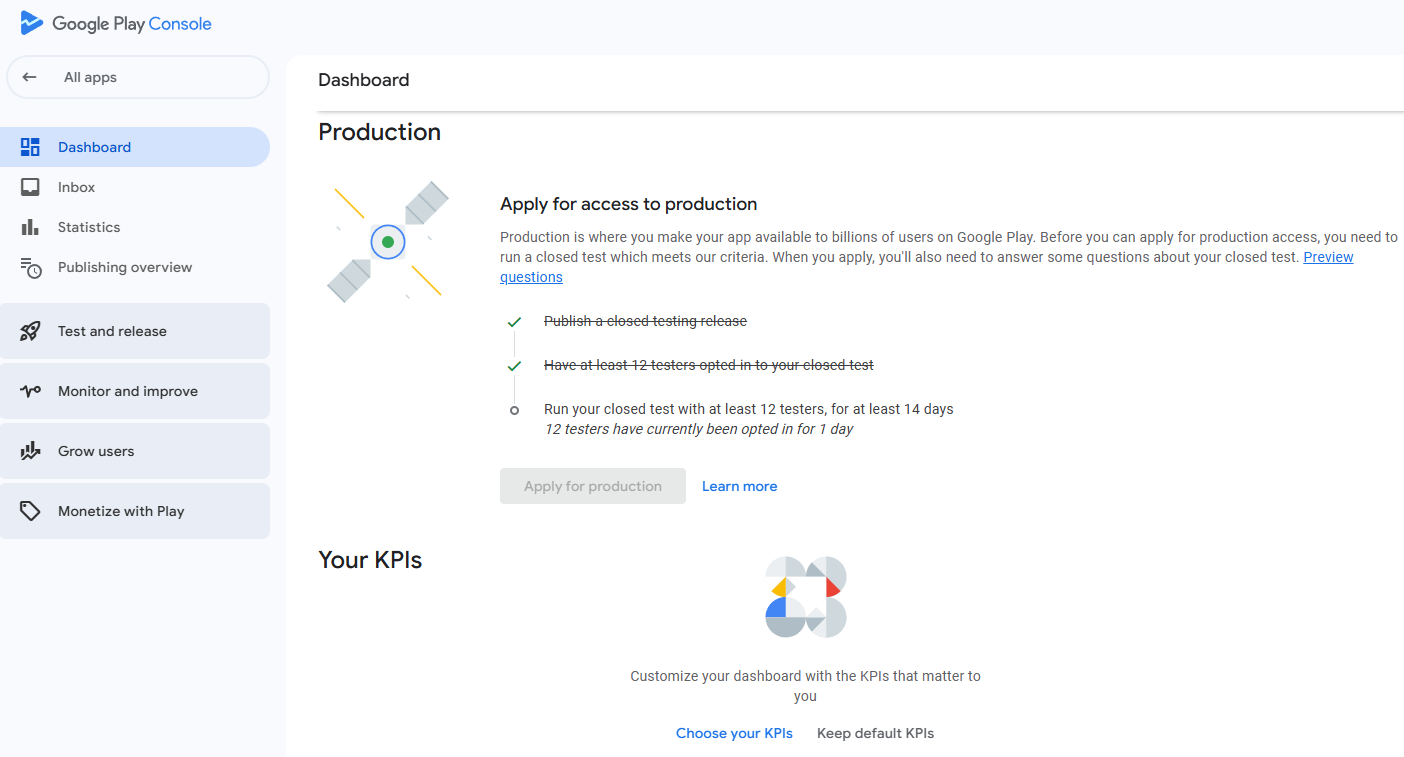
For personal Google Play developer accounts created after November 13, 2023, Google requires a closed test with at least 12 testers opted in continuously for at least 14 days before the developer can apply for production access. Check your account type and creation date against Google's current rules. Completing the minimum period makes you eligible to apply; it does not guarantee approval.
Read the full guide: How to Get 12 Testers for Google Play Closed Testing →
Official Google Play reference ↗
Developer Account Types
Understand why account type and creation date matter.
Google's 12-tester, 14-day requirement specifically identifies personal developer accounts created after November 13, 2023. Do not assume every personal or organisation account follows the same eligibility path. Check the current Play Console requirements for your own account before planning a campaign.
Read the full guide: Why Does Google Play Require 12 Testers? →
Official Google Play reference ↗
Testing Tracks Explained
Learn the difference between internal testing, closed testing, open testing, and production.
Internal testing is designed for quick distribution to a small group, with up to 100 testers. Closed testing lets you distribute a release to a selected group. Open testing makes a test available to a broader audience when the account is eligible. Production is the public release track. For eligible new personal accounts, the closed-testing requirement must be met before applying for production access.
Read the full guide: Google Play Closed Testing vs Internal Testing →
Official Google Play reference ↗
Finding and Inviting Testers
Plan recruitment and communicate the testing expectations clearly.
Recruit people who can access the test and are willing to participate throughout the testing period. You can use personal or professional contacts, relevant developer communities, and appropriate tester networks. Inviting a few more than the minimum can provide a practical buffer against opt-outs. However, only eligible testers who remain opted in count toward the continuous requirement.
Read the full guide: How to Find Testers for Google Play Closed Testing →
Official Google Play reference ↗
Email Lists and Google Groups
Choose and manage the access method for your closed-testing audience.
Play Console allows closed-test access to be managed using email lists or Google Groups. For email-based testing, select the relevant tester list. For Google Groups, testers generally need to join the specified group before opting in. Keep the access list accurate and ensure your instructions match the method configured in Play Console.
Read the full guide: How to Add Testers in Google Play Console →
Official Google Play reference ↗
Tester Opt-In Explained
Know the difference between an invitation, an opt-in, and an installation.
Sending a test link or adding an email address does not by itself establish that a tester has opted in. Each tester needs to complete the opt-in process for the applicable test. For a closed test using a Google Group, the tester must first join the group. Share the correct opt-in and installation instructions and verify that testers can access the release.
Read the full guide: How to Join a Google Play Closed Test →
Official Google Play reference ↗
The Continuous 14-Day Timeline
Plan the testing period and understand what happens if a tester opts out.
For eligible accounts, at least 12 testers must remain opted in continuously for the required 14 days before applying for production access. If a tester opts out and later opts in again, the earlier period does not combine with the new period to make 14 consecutive days. Track opt-in status and do not treat invitations or downloads as substitutes for the actual requirement.
Read the full guide: What Is the 14-Day Closed Testing Requirement? →
Official Google Play reference ↗
Common Testing Mistakes
Avoid preventable problems with access, releases, and tester counts.
Common issues include sharing the wrong link, forgetting the Google Group membership step, assuming an invitation means opt-in, losing testers during the required period, and leaving app setup or release problems unresolved. Test links may take several hours to become available after the first release or certain changes. Check Play Console status and the official instructions before changing your campaign.
Read the full guide: Google Play Closed Testing: Complete Guide →
Official Google Play reference ↗
Tester Engagement and Feedback
Build a meaningful testing process that helps improve the app.
A useful closed test is more than a headcount. Give testers clear tasks, ask them to explore relevant features, and provide a simple channel for reporting bugs and usability problems. Record the feedback you receive and the changes you make. Google asks about tester engagement and feedback collection when you apply for production access. Public reviews are not available for test versions, so use an appropriate private feedback channel.
Official Google Play reference ↗
Apply for Production Access
Prepare for the application and the questions in Play Console.
Once the applicable testing criteria are met, open the Play Console Dashboard and select Apply for production. Google asks about the closed test, your app or game, and production readiness. Be prepared to explain how you recruited testers, how they engaged with the app, what feedback you received, what your app does, and what you changed based on testing.
Read the full guide: How to Apply for Google Play Production Access →
Official Google Play reference ↗
Production Readiness Checklist
Review functionality, policy compliance, privacy, and reviewer access.
Before applying, verify that core features work, crashes and major bugs have been addressed, app content and monetisation comply with Google Play policies, and the store listing and target audience are accurate. If your app requires login, provide working review credentials when requested in Play Console. Keep evidence of feedback and improvements so you can explain why the app is ready.
Read the full guide: Google Play Testing Requirements for Android Developers →
Official Google Play reference ↗
If Production Access Is Not Approved
Understand possible next steps and how to improve a future application.
An application may require more testing, including when the required number of testers is not continuously opted in or engagement is insufficient. Read the outcome and instructions in Play Console, address the issues, continue testing where needed, and document improvements before applying again. Never assume that reaching day 14 guarantees approval.
Official Google Play reference ↗
After Production Access
Understand what changes after the production track becomes available.
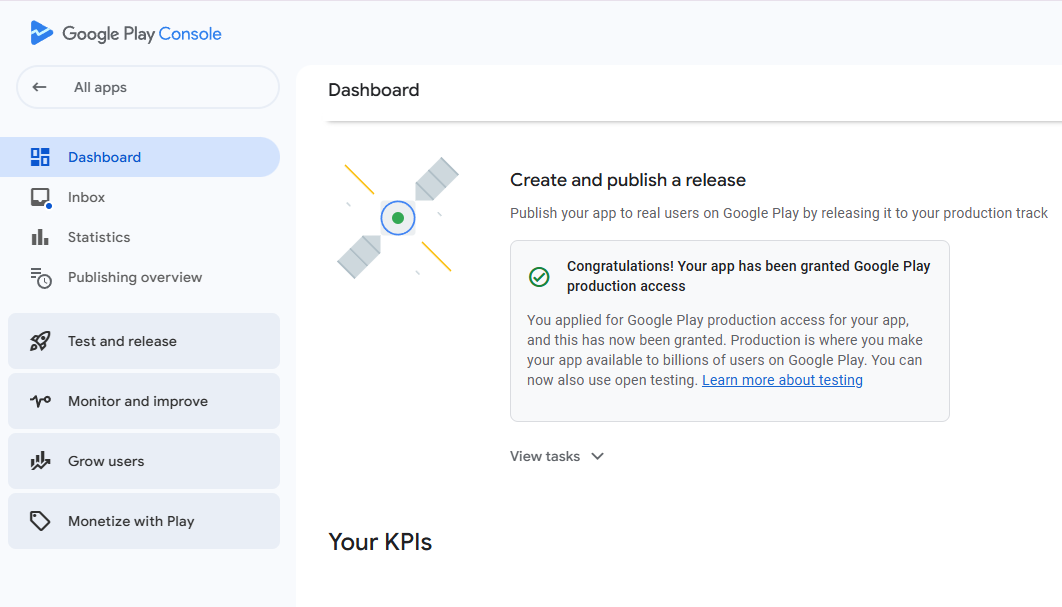
Production access allows you to proceed with a production release, subject to the applicable Play Console publishing and policy requirements. Review the production track, confirm the release configuration, and follow Google's publishing workflow. Approval for production access does not remove the obligation to comply with Google Play policies or pass applicable app reviews.
Read the full guide: What Happens After 14 Days of Closed Testing? →
Official Google Play reference ↗
Closed Testing FAQ
Get quick answers about timing, tester status, links, and approval.
Concise answers to the questions that come up most often, each one linked to the detailed guide or the official documentation behind it.
- Who does the 12-tester, 14-day rule apply to?
- Personal developer accounts created after November 13, 2023. Check your account type and creation date against the current Play Console requirements before planning a campaign.
Why Does Google Play Require 12 Testers? →
- What does "continuous opt-in" mean?
- At least 12 testers opted in without a break for the required 14 days. If someone opts out and later opts back in, the earlier period does not combine with the new one to make 14 consecutive days.
What Is the 14-Day Closed Testing Requirement? →
- Why does the test link not work yet?
- Test links may take several hours to become available after the first release or certain changes. Check the Play Console status, and remember that adding an email address or sending an invitation is not an opt-in.
How to Join a Google Play Closed Test →
- Are public reviews available during closed testing?
- No. Public reviews are not available for test versions, so collect bug reports and usability problems through an appropriate private feedback channel.
Google Play's official documentation →
- What happens after the 14 days?
- Meeting the requirement makes an eligible developer able to apply for production access. Google then reviews the application, and reaching day 14 does not guarantee approval.
What Happens After 14 Days of Closed Testing? →
Read the full guide: Google Play Closed Testing: Complete Guide →
Official Google Play reference ↗

 Fiverr
 Upwork
 Kwork